Many People Are Getting Tired Of Artificial Intelligence Integration Into Every App, So Pinterest Finally Gave A Way To Disable It. Here Are The Instructions! » TwistedSifter
Publish Date: 2026-02-07 06:57:00
Source Domain: twistedsifter.com
- Advances in artificial intelligence have many applications but also lead to frustration due to incessant AI usage in technology.
- Users have expressed a desire for more control over AI recommendations, prompting companies to provide opt-out options.
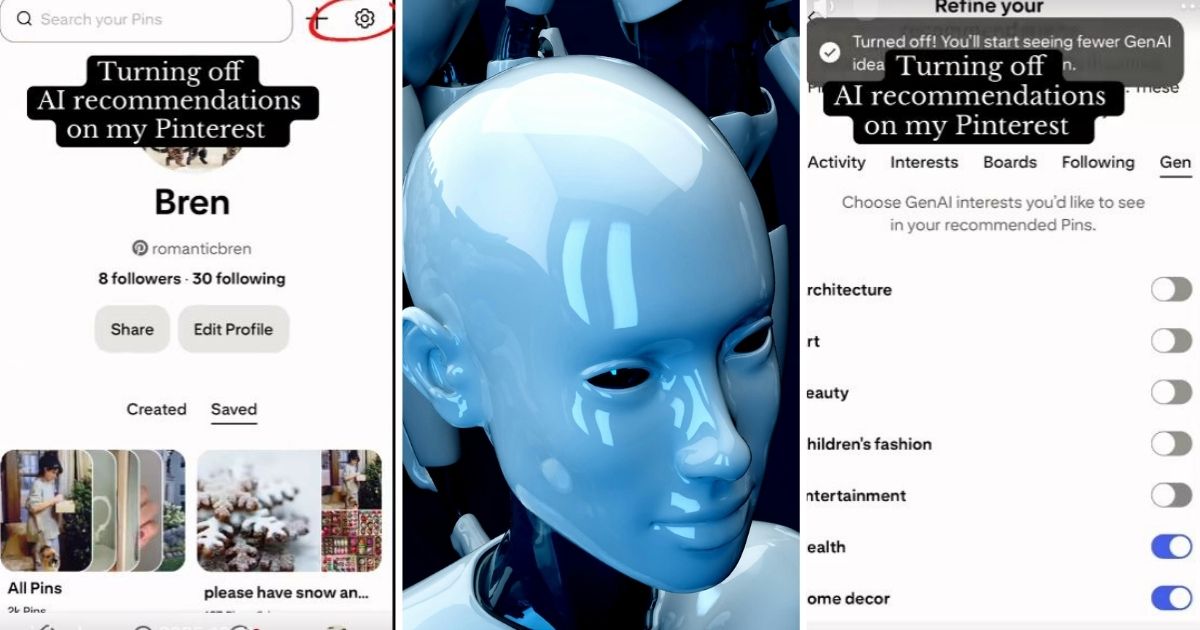
- A TikToker demonstrated how to disable AI recommendations on Pinterest, providing a useful guide for users.
- To disable AI on Pinterest: access the gear icon, select “Refine Your Recommendations,” then click on “Gen” to turn off specific GenAI interests.
- Once deactivated, the AI no longer influences Pinterest content for the user.
- Helpful tips in the comments section included methods for the mobile app version and acknowledged user appreciation for the workaround.
- The TikTok video showcasing these steps has garnered significant attention and offers a real-time demonstration.